School management system · Pakistan

School management software
for schools in Pakistan.

Admissions, attendance, exams, fees, payroll and messages to parents — all in one place, for a single school or a group of campuses. No more separate registers, spreadsheets and WhatsApp groups that never quite match.

A 30-minute walkthrough. We'll discuss pricing on the call.

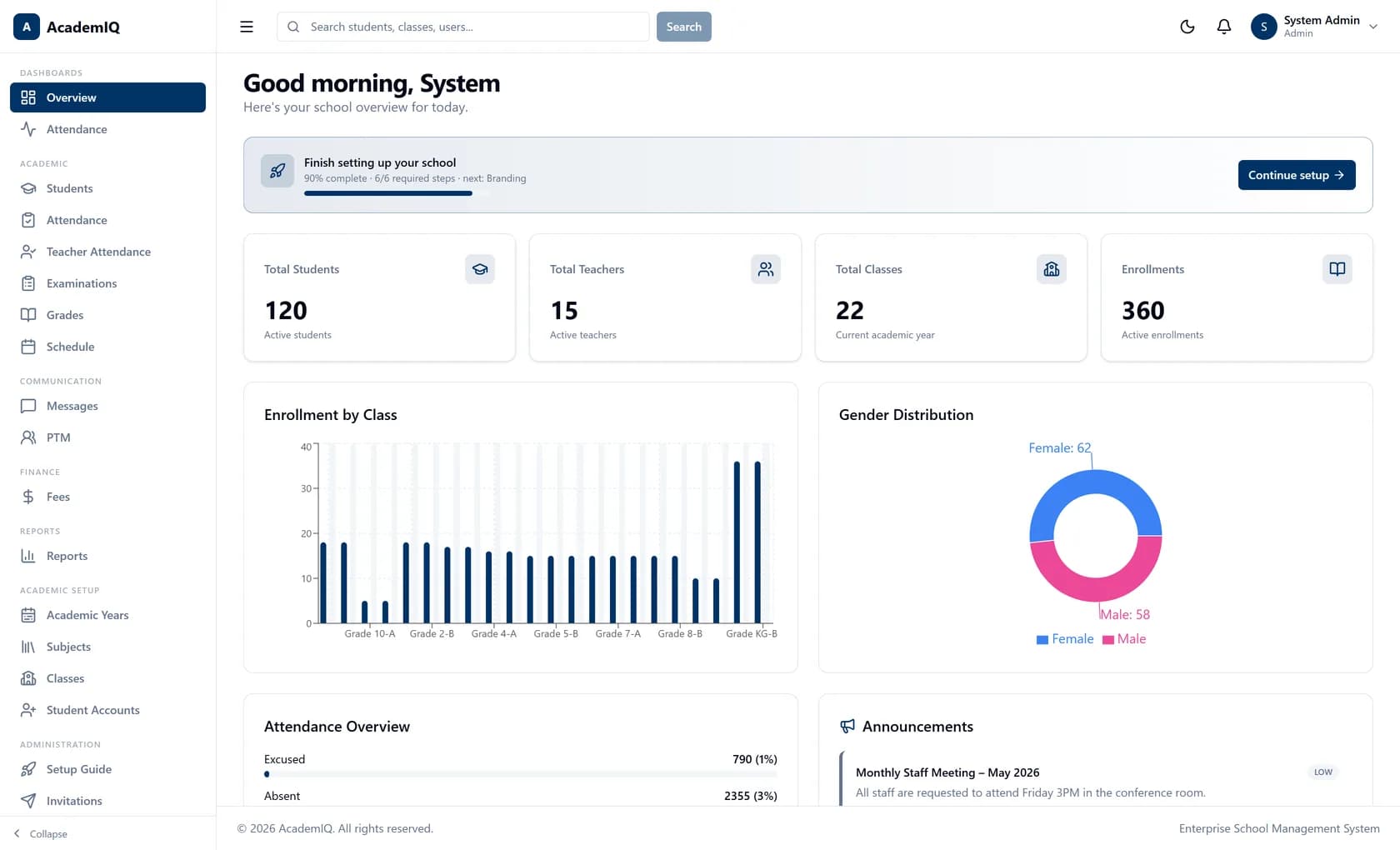
AcademIQ administrator dashboard showing total students, teachers and classes, enrollment by class, gender distribution and an attendance overview
things it handles
20+things it handlesFrom admissions right through to staff salaries
kinds of user
5kinds of userLeaders, teachers, parents, students and office staff
record per student
1record per studentOne record from admission to leaving — not five copies
languages
4languagesEnglish, Arabic, Hindi and Chinese

Who it's for

Everyone in the school, not just the office

One system, five kinds of user. Each one signs in and sees what their own job needs — nothing more, nothing less.

  • Principals & school leaders

    See how the school is doing, today.

    Open one screen and see how many students are enrolled, how many came in this morning, how much of this month's fees has been collected and how much is still outstanding. No waiting for someone to prepare a report.

    • Today's numbers, not last month's
    • All your campuses in one view
    • A record of who changed what
  • Teachers

    Less paperwork, more teaching.

    Mark the register in seconds from your phone or a computer. Enter a whole class's marks in one go. Check your own timetable. Message a parent without giving out your personal number.

    • Mark attendance in seconds
    • Enter marks for a whole class at once
    • Your timetable and your classes
  • Parents

    Know the same day, not at the end of term.

    Get a message the morning your child is absent or late. See marks as soon as they are published, along with report cards, fee slips and receipts. Book a parent-teacher meeting. Everything for each of your children, in one place.

    • Same-day absence alerts
    • Marks and report cards
    • Fees, receipts and online payment
  • Students

    Your timetable and your results, on your phone.

    See your class timetable, your marks, your exam results and your certificates. You see your own record and nobody else's.

    • Your timetable
    • Your results and certificates
    • Only your own record
  • Admin & office staff

    The right access for the job you do.

    The front desk, the library and the accounts office each get exactly what that job needs — and nothing it does not. Set up classes, subjects, timetables and fee structures without calling a developer.

    • Only the access the job needs
    • Set up the school yourself
    • Bring in your existing lists

Why schools change

The work is not the problem.
The seams are.

Most schools already have software. What they do not have is one place where the student record, the register, the mark, the fee bill and the message all point at the same child.

AcademIQ keeps one record per child. Admit a student in the morning and they are on the register that afternoon, in the mark sheet that term, on the fee bill that month and visible to their parent throughout — because it is one record, not five copies of one.

One record. One set of rules. One history.

Four spreadsheets, four answers

Attendance in one file, marks in another, fees in a third, staff records in a fourth. When they disagree, nobody knows which one is right.

The school runs on WhatsApp

Absences, results and fee reminders go out from personal phone numbers. None of it is kept, and it all leaves with the teacher.

Software that does not talk to itself

A fees program, a marks program and a messaging service — none of them sharing the same student list. Somebody matches them up by hand.

Month-end takes a week

How much came in and how much is still owed only becomes clear days later, once someone has stayed late to add it up.

A look inside

This is the actual software

Not drawings of what it might look like — these are photographs of the real screens. Names and numbers belonging to real people are blurred, because this is a public page. Tap any screen to see it larger.

  • DashboardHow the school is doing today, on one screen
  • Student recordsEvery student, their class and their guardian
  • AttendanceMark the register in seconds
  • MarksEnter marks for a whole class at once
  • ExamsExam timetable, papers and results
  • MessagesReach a parent without giving out your number
  • Online classesLive lessons linked to the timetable
  • FeesWho has paid, and what is still outstanding
  • SalariesStaff pay, allowances and payslips
  • Parent meetingsBook meeting slots and record what was agreed
  • CertificatesIssue certificates anyone can verify
  • ReportsThe figures you get asked for, already worked out
  • TimetableThe weekly timetable, by class and teacher

What it does

Five jobs, one system

Grouped the way a school year actually runs — exams, attendance, fees, messages and setting up.

Exams & marks

Exams, marks and report cards

Set the exam timetable, enter marks for a whole class at once, then publish when you are ready. Positions, subject averages and report cards are worked out for you from the marks you entered — you never type the same number twice.

  • From exam timetable to resultCreate an exam, set a date for each paper, enter the marks, then publish. Class positions and subject averages are calculated automatically.
  • Tests and assignments tooQuizzes, tests, projects and assignments each count for however much you decide, and add up to the grade using your school's own grading scale.
  • Report cardsTerm report cards, monthly progress reports and exam reports — built from the same marks the parent already sees, so they always match.
  • CertificatesIssue certificates to students and staff. Each one carries a code that anyone can use to check it is genuine, without needing an account.

Attendance

Attendance the parent hears about the same morning

Teachers mark the register in seconds. If a child is absent or late, the parent is told straight away rather than at the end of term. Patterns nobody has time to spot show up on a simple chart.

  • Students and staffPresent, absent, late, excused or half-day for students. Leave types for teachers, with their own reports you can download.
  • Parents told the same day, on WhatsAppAn absence or a late mark reaches the parent straight away over WhatsApp, SMS or email — whichever they actually read. A daily summary goes out at whatever time you choose, from your school's own messaging account.
  • Spot the pattern earlyA simple chart shows attendance by class and by student, so a child slowly dropping off is noticed in week three rather than at the end of term.

Fees & salaries

Fees collected and salaries paid

Set your fee amounts once and the system issues them, tracks who has paid and shows what is still outstanding. On the other side: staff salaries, allowances, deductions and payslips.

  • Fees that match how you chargeMonthly, quarterly or yearly, set per class or per student, with discounts and one-off charges handled properly instead of in a side spreadsheet.
  • Paying onlineParents can pay by card, and the money goes into your school's own bank account. If you run several campuses, each one collects into its own.
  • Salaries and payslipsBasic pay, allowances and deductions for each staff member, run for each month, with a payslip every employee can download themselves.
  • The numbers you get asked forHow much has been collected, how much is outstanding, and what percentage that is — always up to date, never a month behind.

Messages

One place for school messages

Messages between staff, parents and students, plus announcements to the whole school. Everything stays on the school's record instead of on someone's personal phone.

  • Direct messagesA teacher can message a parent without handing out their personal number, and the conversation stays with the school when that teacher moves on.
  • AnnouncementsSend to the whole school or just one group, and mark it urgent when it is — so a closure notice does not look like a reminder about uniforms.
  • Parent-teacher meetingsSet meeting times, tell parents, and write down what was agreed against the student so next year's teacher knows the history.
  • Told as it happens, on the channel they readMarks published, fees due, attendance marked, a new message — each reaches the right person the moment it happens, over WhatsApp, SMS or email. Your school connects its own messaging account, so alerts come from your school's number.

Setting up

Set the school up once, then run it

Sessions, classes, sections, subjects and timetables. Staff accounts and what each of them can see. Bring in the lists you already have. All done from inside the software, without needing a developer.

  • Your school's structureAcademic sessions, classes and sections, subjects, which teacher takes what, and a weekly timetable with rooms.
  • Roles that fit real jobsThe standard roles cover most people. When someone's job does not fit one — a bursar, a head of year — build a role that does, instead of giving them full access.
  • Bring your existing listsUpload your student and staff lists from a spreadsheet. If a row has a problem, you are told which row and what is wrong, rather than the whole file being rejected.
  • Guided setupA step-by-step setup takes your administrator through structure, people, branding and settings, and will not let you go live until the essentials are done.

Multi-campus

One group.
Genuinely separate campuses.

If you run more than one campus, each gets its own settings, its own branding and its own students, kept completely apart from the others. Whoever runs the group still sees them all together in one view.

Its own brandingEach campus has its own logo, colours and sign-in page. Parents see their school, not ours.
Its own bank accountFees paid to one campus go into that campus's own account, never a shared pot.
Its own name on emailMessages and alerts go out in that campus's own name, not a general one.
Its own numberingTwo campuses can use the same email addresses and roll numbers without clashing.
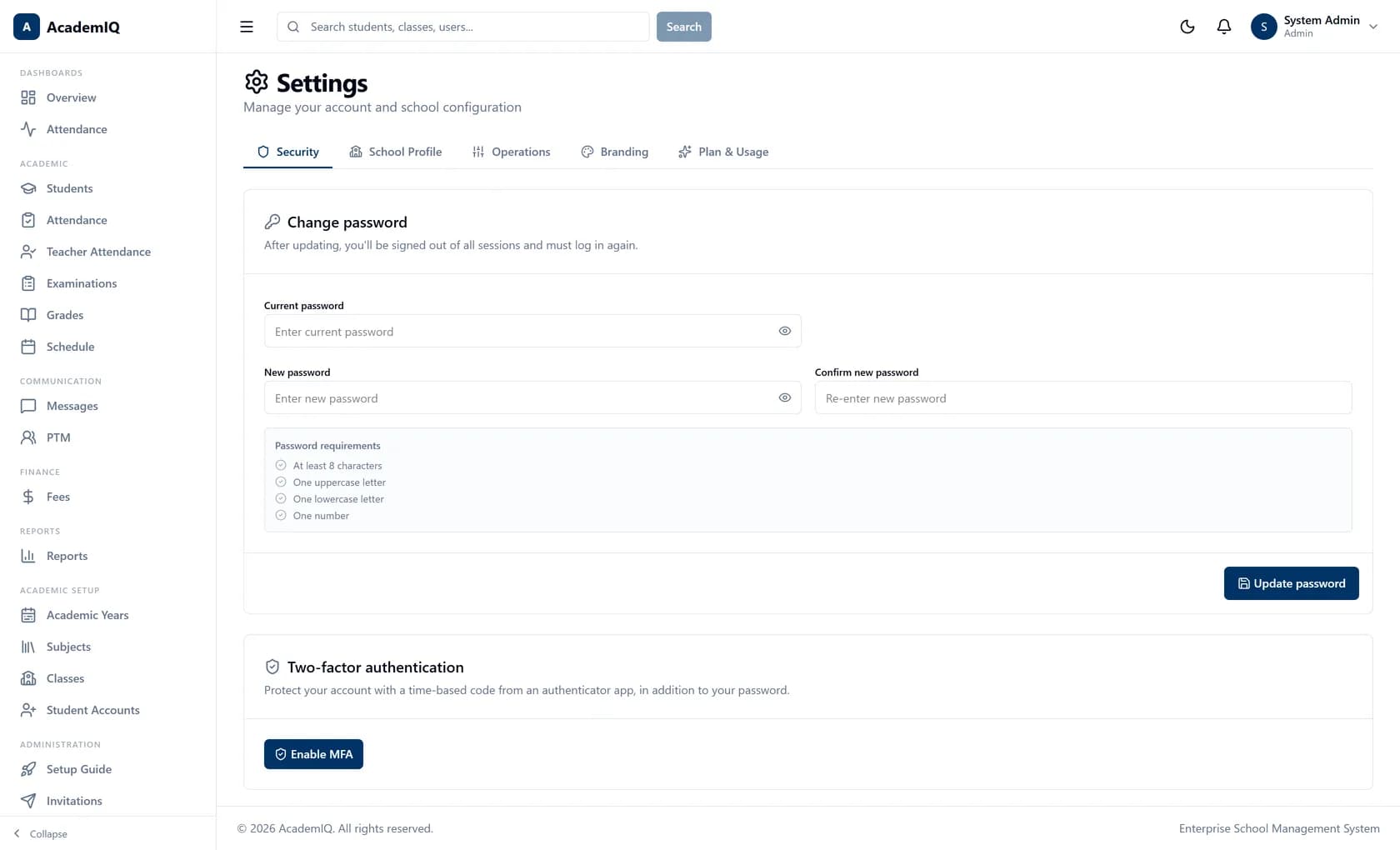
AcademIQ school settings showing per-school profile, branding and configuration options

Anywhere

Works on the phone in your pocket

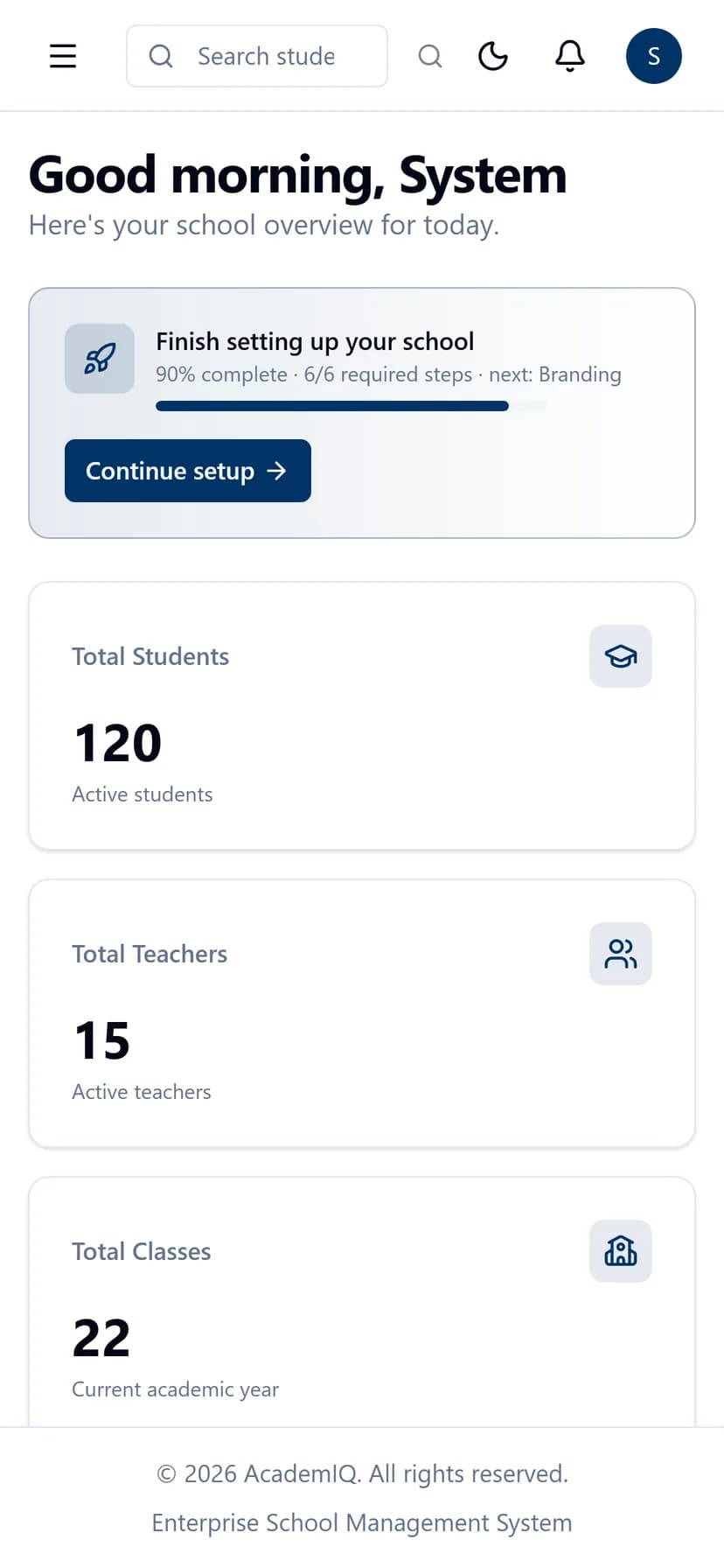
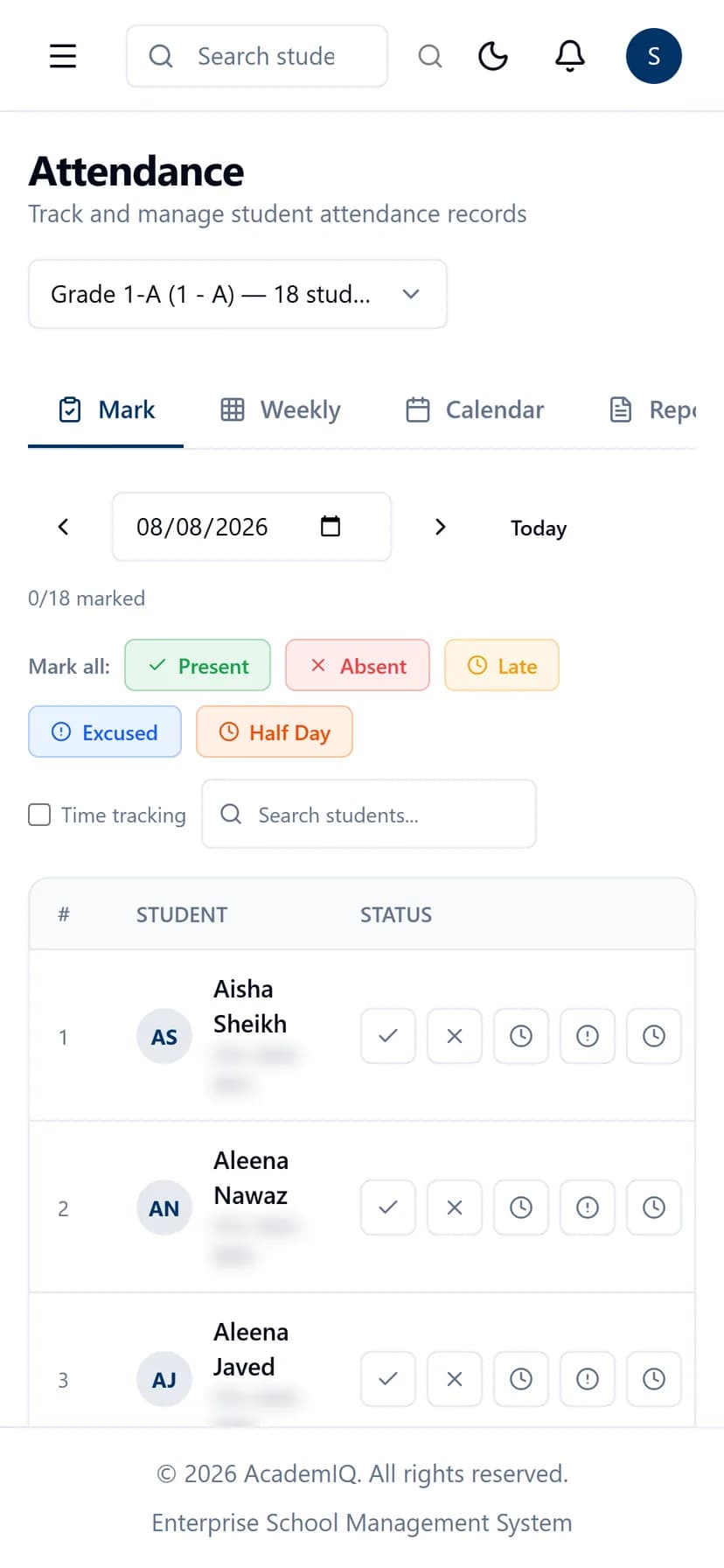
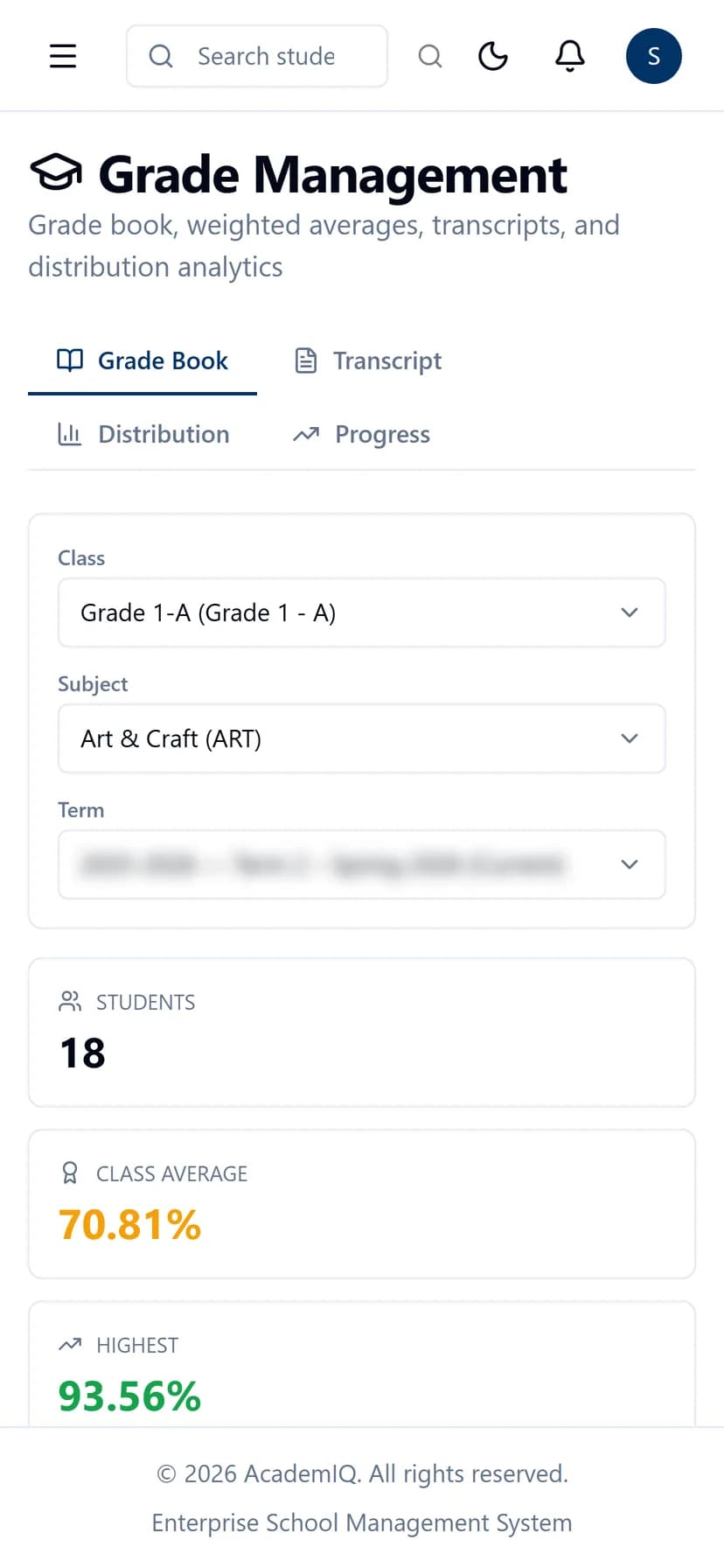
Teachers mark the register between lessons. Parents check a result on the way home. It is the same software on a phone as on a computer — nothing missing, nothing cut down.

AcademIQ dashboard on a mobile phone browser
AcademIQ attendance register on a mobile phone browser
AcademIQ grades view on a mobile phone browser
The full thing on a phoneOpens in the phone's browser. Nothing to install, nothing left out.
Four languagesEnglish, Arabic, Hindi and Chinese, with Arabic laid out right to left.
Your currency, your sessionFee amounts and academic sessions follow how your school already works.
Updates as they happenMarks, fees, attendance and messages appear straight away. No refreshing, no waiting.

Security

Student data is the most
sensitive data a school holds.

Medical notes, parents' phone numbers, identity documents, welfare records. Keeping them safe was not added at the end — it shaped how the whole system was built, and it is the part we are happiest to be questioned about.

Your school stays yours

No other school using AcademIQ can reach your students — not by searching, not by guessing, not by accident.

Everyone sees only their part

A parent sees their own children. A teacher sees their own classes. You decide the rest, job by job.

Hard to break into

Passwords nobody can read back — not even us. Accounts that lock themselves after repeated wrong tries. An extra check on the phone for staff who need one.

A record of who did what

A mark changed, a fee waived, a record deleted — each saved against the person who did it and the time, and it cannot be quietly edited afterwards.

Pakistan

Built for schools in Pakistan

Same-day WhatsApp alerts to parents, fee structures that match how schools here actually charge, and campuses that stay properly separate under one owner. Quoted in rupees after a demo.

Getting started

From the first call to the first register

Four steps, and no drawn-out procurement. A demo, a price, your own space set up, then a guided setup that will not let you go live half-finished.

  • Step 1: A demo call

    About thirty minutes on the real software, following how your school actually works rather than a slide deck. At the end we know what you need, and we give you a price for it.

  • Step 2: Your own space

    Your school is set up in its own separate space, with your branding, your web address, your bank account for fees and email that goes out in your name. Nothing is shared with any other school.

  • Step 3: Setting up

    A step-by-step guide takes your administrator through classes, subjects, timetables, staff and your existing student lists. A checklist keeps track, and will not let you go live half-finished.

  • Step 4: Live, with help on hand

    You start using it with your data already in and your staff invited. When you need help, you reach the people who built it.

Questions

Questions schools ask us

  • We discuss price on the demo call. Schools differ so much in size, in how many campuses they run and in which parts they will actually use that any price printed here would be wrong for almost everyone. The call takes about thirty minutes; after it we give you a price for what you actually need.

See it running on your school's terms

Thirty minutes on the live system, driven by your workflows rather than a slide deck. Bring the awkward cases — the mid-year transfer, the sibling discount, the campus that does things differently.

  • 30 minutes, live system
  • Pricing discussed on the call